
FRAYT Driver
FRAYTMaps & Navigation
3.6240.00 Reviews
- Version
- 3.14.4
- Installs
- 100.00K
- Age Rating
- Everyone
Screenshots
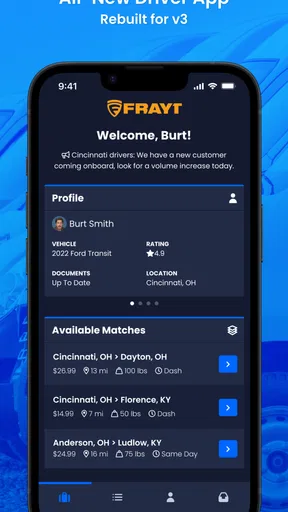
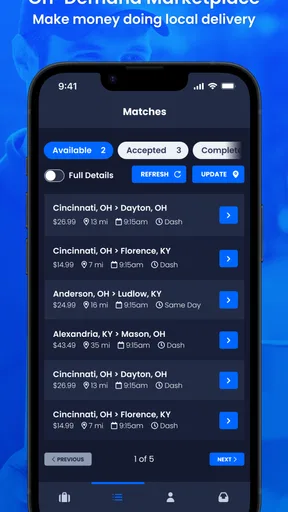
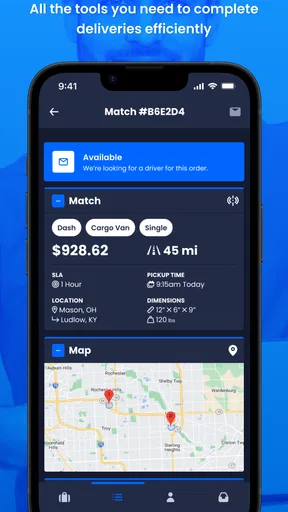
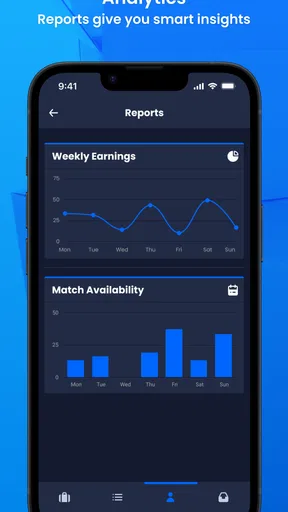
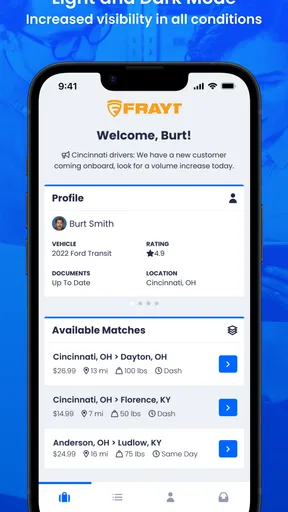
Our Review of FRAYT Driver
 Analysis by Appyee
If you are looking at FRAYT Driver because you want to make deliveries through FRAYT, the first thing to understand is its role: this is a work app for drivers, not a general navigation tool for everyday trips. I approached it as someone preparing for a first delivery, and that distinction made the experience much easier to understand. The app is built around the driver side of the FRAYT service, so its value depends on whether you are actually using that delivery network and need a focused place to manage related work.
FRAYT Driver is a free Maps & Navigation app from FRAYT, with an Everyone content rating. It was released on June 20, 2023, and the current version is 3.14.4 for devices running Android 11 or later. The store presents it as the official driver app, but I would not treat that phrase as a promise that it replaces every tool you normally use on the road. In practice, I see it as the work-facing part of a delivery workflow, while a familiar navigation app may still be useful for the actual route.
What to expect before accepting your first delivery
The most important expectation to set is that this app is aimed at drivers who need to interact with FRAYT assignments. It is not designed like a consumer map with broad points-of-interest search, public transit planning, saved vacation routes, or the extensive customization you may find in a dedicated navigation product. If your goal is simply to get from home to a restaurant or compare driving routes, this is probably the wrong download.
For the right user, the appeal is concentration. A driver does not want a crowded screen filled with unrelated travel features while trying to understand the next work step. A specialized driver app can keep attention on the delivery process, which is helpful when you are moving between pickup and drop-off locations. That focus is also the first trade-off: the app is more relevant to FRAYT work than to general driving, but it may feel limited if you expect an all-purpose navigation companion.
The public reception is mixed rather than universally enthusiastic. FRAYT Driver has an average rating of 3.6 from around 1.3 thousand ratings, with roughly 240 written reviews and over 100 thousand installs. I read that as a reason to approach it practically: the app has a real user base, but you should judge it by whether it makes your own delivery routine clearer instead of assuming the rating tells the entire story.
The app is most useful when it becomes the control point for a delivery, not when you expect it to be your only driving tool. That difference affects everything from setup to how you handle a confusing address. I would keep your normal navigation option available, especially for unfamiliar areas, and use FRAYT Driver for the FRAYT-specific part of the job.
Who will get the most from it
This app makes sense for someone who already drives for FRAYT or is preparing to do so and wants the official mobile workspace on a compatible phone. It can also suit a driver who prefers separating work information from personal navigation, since that separation reduces the temptation to mix delivery details with unrelated apps. The experience is easier to manage when the phone is treated as a work tool during a route rather than as a general-purpose screen full of distractions.
I would skip it if you are a customer waiting for a delivery, a traveler looking for turn-by-turn directions, or a driver who has no connection to FRAYT. Installing it just to explore a map would not give you a meaningful reason to keep it. The app’s purpose is narrow, and that is a strength only when your situation matches it.
How it differs from ordinary navigation apps
Google Maps, Apple Maps, and similar services are built to help almost anyone plan movement. They are usually better for comparing alternate routes, finding fuel or food, checking a familiar place, and navigating a trip that has nothing to do with delivery work. FRAYT Driver belongs to a different layer of the process. It is concerned with the driver’s relationship to FRAYT work, while a standard map is concerned with the road network and the destination.
That means the best comparison is not “which map is better?” but “which task is each app responsible for?” If I were handling a delivery, I would use FRAYT Driver to stay aligned with the work assignment and use a conventional navigation app when I needed richer road guidance. Trying to force one app to do both jobs can create unnecessary friction, particularly when an address is incomplete or a destination has multiple entrances.
Setting up the app without making the first trip harder
The first step is straightforward: install FRAYT Driver on a device running Android 11 or newer, then open it when you have enough time to pay attention rather than while already parked outside a pickup location. I recommend starting on a stable connection and keeping the phone charged. Those are ordinary precautions, but they matter more for a work app because a rushed setup can turn a small login or screen-reading problem into a missed step later.
Do not begin by accepting the first available task before you understand the basic layout. Spend a moment identifying where the current work item, location details, and status actions appear. The exact order of screens can change as the app develops, but the useful habit remains the same: read the assignment first, then decide how you will navigate to it. This prevents you from opening a map immediately and overlooking information that belongs to the delivery itself.
I also suggest preparing your phone before the first shift. Put the app somewhere easy to reach, make sure you can read the screen in daylight, and decide where the device will sit while driving. The app cannot solve a poor phone position or an unsafe habit. A secure mount and voice guidance from your preferred navigation tool are more valuable than repeatedly touching the screen after you leave the curb.
One practical point that new drivers often overlook is the difference between being ready to work and being ready to drive. You can be signed in and still not be prepared for the route. Before moving, check the pickup and drop-off information, look for apartment or building notes, and identify whether the destination might have a confusing entrance. This small pause is often more useful than trying to decode the address after arrival.
Making the first meaningful action deliberate
Your first successful action should not be measured by how quickly you tap through the app. It should be the moment you understand what the current delivery requires and can move toward the next location with a plan. I would open the assignment, read the details from top to bottom, and then hand route planning to the navigation app you trust if the road guidance is clearer there.
For example, imagine receiving a delivery while parked and preparing to collect it. I would first confirm the pickup location inside FRAYT Driver, note any instructions that could affect the handoff, and only then start directions. Once I arrive, I would avoid marking progress until I had actually completed the physical step the screen is asking me to confirm. That order keeps the digital record closer to what happened in the real world.
This is one of the app’s most important workflow lessons: use status changes as a record of completed actions, not as a shortcut through the route. If you tap ahead because you are trying to save time, you may create confusion for yourself later. A delivery app is not just a map; it is also a sequence. Moving through that sequence carefully is more reliable than trying to predict which screen will appear next.
When the first delivery goes smoothly, take note of what made it easy. Perhaps the address was clear, the pickup was simple, or your navigation app handled the route well. On the next task, look specifically for what changes. Building your own routine around these differences is more useful than expecting every delivery to feel identical.
A realistic everyday workflow
Here is how I would approach a normal workday. Before leaving, I would open FRAYT Driver and review the available delivery information while stationary. I would check the sequence of locations, identify the next immediate action, and prepare external navigation only after I understood the assignment. At the pickup point, I would follow the app’s workflow carefully instead of relying on memory.
After collecting the delivery, I would confirm the destination and look at the route in my navigation app. If the destination is a large building, I would slow down before the final turn and compare the map pin with the written location details. On arrival, I would complete the handoff, then update the delivery status while parked. Finally, I would glance at the next assignment only once the current one is properly closed.
This routine has a useful trade-off. It takes a little more attention at the beginning of each delivery, but it reduces the chance of mixing up locations or skipping a required step. The app works best when you treat it as a checklist tied to real actions, not as a screen to keep tapping while walking or driving.
Common confusion and the limits you should plan around
I find it helps to separate two questions before a delivery: what FRAYT Driver is asking me to do, and what I need to do to reach the place safely. Keeping those tasks distinct makes it easier to notice when an address, entrance, or status step deserves a second look. That distinction also sets up the practical limits worth planning for before relying on the app during a busy route.
When the map and the delivery details seem to disagree
A navigation app may choose a road entrance that is technically close but inconvenient for a loading area, apartment complex, or commercial building. FRAYT Driver should be your reference for the work assignment, while the map should help you reach the area. If the two seem inconsistent, stop and inspect the written details rather than blindly following the fastest-looking route.
This is a good example of why I would not replace a full navigation app with FRAYT Driver. General map services tend to offer more mature route alternatives and broader location context. The delivery app’s specialized role is valuable, but it does not remove the need for judgment at the curb, in a parking lot, or near a building with several entrances.
When you are unsure whether to update the status
New users can hesitate because the app’s next action may appear before the physical job is complete. My rule is simple: do not report a step until you have actually performed it. If you have arrived but are still looking for the correct entrance, you are not finished with the arrival stage. If you have collected an item but have not checked the destination, do not rush into the next part of the route.
This approach also helps if something goes wrong. A clear sequence makes it easier to explain where the problem occurred, whether the issue was at pickup, during transit, or at drop-off. Even without adding extra detail, maintaining an honest timeline gives you a more dependable record of the delivery.
When the app feels less polished than expected
The 3.6 average rating suggests that the experience will not be perfect for every driver. I would expect occasional friction from a specialized work app: a screen may require more attention than a consumer app, a workflow may feel rigid, or the handoff between delivery information and navigation may not be as smooth as you want. Those are not reasons to dismiss it immediately, but they are reasons to build a backup habit.
My backup habit would be to keep the phone charged, know how to reach the address without repeatedly switching screens, and avoid accepting a new task while still resolving the previous one. If the app becomes confusing, pull over safely and reread the current step. The worst response is trying to solve a workflow problem while in motion.
When a different option is better
If you need detailed route planning, offline map access, public transport information, or a broad search for nearby services, a standard navigation app is the better choice. If you are not a FRAYT driver, there is no compelling reason to make this part of your everyday map setup. Its narrow purpose is not a flaw, but it does mean the app should be judged against driver workflow rather than against the feature list of a consumer mapping platform.
I would also be cautious about relying on it as the sole tool for a complicated route. A delivery driver may need information about road closures, alternate entrances, parking, or a destination that is difficult to identify from the street. Keeping a second navigation option is not wasteful in that situation; it is a sensible division of responsibilities.
My recommendation after using it as a first-time driver
FRAYT Driver is worth trying if FRAYT is part of your work and you want the official driver-focused app on your phone. It is free, available to an Everyone audience, and has passed the early stage of adoption with more than 100 thousand installs. FRAYT is also the named developer, so the app’s identity is clear rather than being an unrelated navigation download using similar wording.
My recommendation comes with a specific condition: start with one delivery when you are not rushed. Learn the order of the screens, read the assignment before opening your route, and complete each status update only after the matching real-world action. That first controlled attempt will tell you more than a quick glance at the store page because you will see whether the workflow fits the way you drive.
The app is not the right choice for general navigation, and I would not ask it to replace Google Maps, Apple Maps, or another route specialist. Its strength is being tied to FRAYT driving, while its weakness is that this specialization can leave gaps when you need broader road information. Used together with a dependable navigation tool and a careful routine, that division can work well.
For a first-time user, the next step is simple: install the current 3.14.4 release on a compatible phone, open it while parked, and become familiar with the delivery sequence before taking on a busy route. Keep your expectations practical, give yourself time to verify each location, and treat the app as a work log as much as a map screen. If your goal is to complete FRAYT deliveries with fewer avoidable mistakes, that focused approach is where the app makes the most sense.
Verdict
Strengths of FRAYT Driver
- Flexible delivery work with the ability to choose available jobs.
- Clear pickup and drop-off details help drivers plan each route.
- Useful income tracking for monitoring completed deliveries.
- Designed for commercial deliveries, including larger vehicle loads.
- In-app updates can reduce the need for calls with dispatchers.
Limitations of FRAYT Driver
- Job availability may vary significantly by location and time of day.
- Some deliveries require cargo space or equipment not every driver has.
- Fuel, maintenance, and vehicle costs can reduce overall earnings.
- Navigation and route details may still need verification before departure.
- Payment timing and eligibility can depend on completed delivery records.
Similar Picks in This Category
View All
Uber - Request a ride
Uber Technologies, Inc.4.7


inDrive. Rides with fair fares
® SUOL INNOVATIONS LTD4.8

Yandex Go: Taxi Food Delivery
Mikromobilnost LLC Belgrade4.8

Bolt: Request a Ride
Bolt Technology4.8

Rapido: Bike-Taxi, Auto & Cabs
Rapido Bike Taxi4.8
Frequently Asked Questions
What is FRAYT Driver, and who can use it?
FRAYT Driver is a delivery app designed for independent drivers and carriers who want to find and complete local or regional delivery jobs. After creating an account and meeting the platform’s requirements, eligible drivers can browse available offers, accept suitable routes, manage pickup and drop-off details, and update delivery status from their phone. Availability may depend on location, vehicle type, and current demand.
What are the requirements to become a FRAYT Driver?
Applicants generally need a valid driver’s license, an appropriate vehicle, proof of insurance, and a smartphone with reliable internet access. FRAYT may also require identity verification, background screening, vehicle information, and additional documentation before approving an account. Requirements can vary according to the type of freight handled and the market where you plan to drive, so check the latest in-app instructions.
How do drivers find and accept delivery jobs in FRAYT Driver?
Once your account is approved, the app can display delivery opportunities based on your service area, vehicle capabilities, and availability. Each offer may include pickup and delivery locations, timing, shipment details, and estimated compensation. Review the information carefully before accepting a job, since accepting a route usually creates an obligation to complete it according to the stated instructions and schedule.
How and when does FRAYT Driver pay drivers?
Payment details can depend on the delivery, market, account status, and FRAYT’s current policies. The app typically lets drivers review compensation information associated with a job and track completed deliveries or payment activity. Before relying on the platform as a primary income source, review the payment schedule, eligibility rules, possible adjustments, and any costs you may have for fuel, maintenance, insurance, or taxes.
Is FRAYT Driver worth downloading for independent delivery drivers?
FRAYT Driver can be useful for drivers who want access to freight delivery opportunities through one mobile platform, especially those with suitable vehicles and flexible schedules. Its main advantages are centralized job information, digital status updates, and the ability to manage deliveries from a phone. However, earnings and job availability are not guaranteed, and drivers should consider operating expenses, distance, timing, and local demand before committing.
